

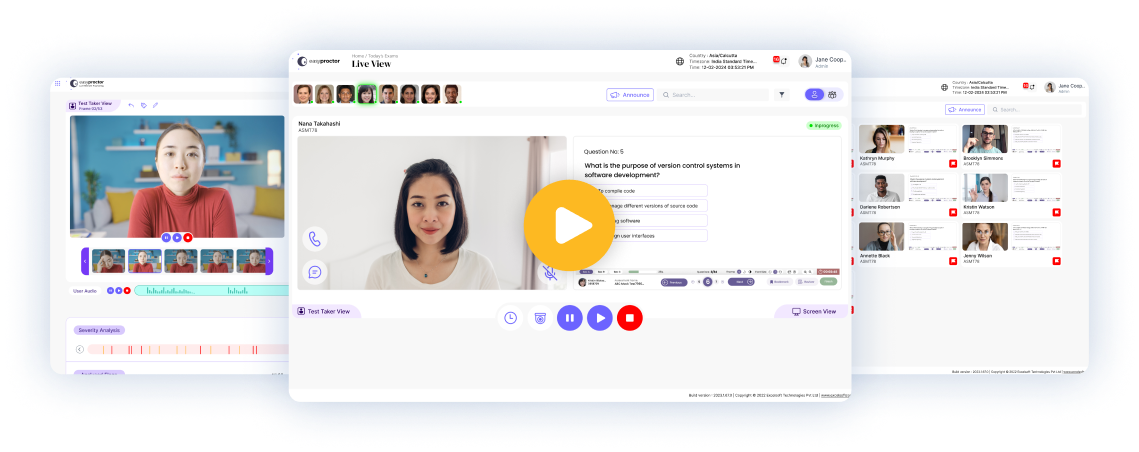
Secure every assessment with AI-powered remote proctoring, intelligent identity verification, human oversight, and enterprise-grade security designed for universities, certification bodies, governments, and enterprises worldwide.
Trusted Assessment Technology Built for Global Scale
25+ Years in Digital Assessment
Built by Excelsoft Technologies, a specialist in digital assessment since 2000.
[XX] Million+ Assessments Delivered
Proven at national and enterprise scale.
Enterprise-Grade Security
Secure browser, encrypted delivery and full audit trails.
Higher Education, Certification & Government
Trusted across regulated and high-stakes testing programmes.
WCAG Level A & AA Conformant
Accessible assessment delivery by design, not by exception.
Multilingual Platform
English, Spanish, Hindi and Kannada, extensible to any language.
Windows & macOS Supported
Secure browser and proctoring across both platforms.
Multi Time-Zone Delivery
Schedule and deliver across regions without manual conversion.
Assessment Integrity Isn’t Just About Catching Cheating

Assessment integrity is about creating confidence for learners, institutions, employers, and regulators. Modern assessments face increasingly sophisticated threats, from identity fraud and unauthorized collaboration to AI-assisted cheating and remote impersonation.
Organizations need more than monitoring — they need a platform that combines intelligent automation, transparent decision-making, and human expertise. easyProctor empowers organizations to conduct secure, scalable, and fair assessments while protecting the experience of genuine learners.
Proctoring Modes
Flexible Proctoring. Complete Control.
Every assessment has different integrity requirements. Whether you’re delivering university examinations, professional certifications, recruitment assessments, or national testing programs, easyProctor lets you choose the right level of security without compromising candidate experience — and match the cost of oversight to the stakes of each examination.
Choose the Right Proctoring Model
A side-by-side view of what each mode delivers, so you can match the model to the examination.
| Capability | Live | Live Automated | Record & Review | Image Mode | Hybrid |
|---|---|---|---|---|---|
| Proctor-to-candidate ratio | 1:8 | 1:20 | No live proctor | No live proctor | AI + Human |
| Monitoring method | Human-led live | AI-powered + human oversight | Recorded for review | Image captures | AI + Human oversight |
| AI monitoring & flagging | Yes | Yes | Yes | Yes | Yes |
| Continuous live video | Yes | On demand | Recorded | Interval images | Configurable |
| Real-time proctor alerts | Yes | Yes | No | No | Yes |
| Pause / resume / terminate | Yes | Yes | No | No | Yes |
| Automatic warning & auto-pause | — | Yes | No | No | Yes |
| Chat & audio with candidate | Yes | Yes | No | No | Yes |
| Secondary camera support | Yes | Yes | Yes | — | Yes |
| Screen & desktop window sharing | Yes | Yes | Yes | — | Yes |
| Process Tracker | Yes | Yes | Yes | Yes | Yes |
| Post-exam review & annotation | Yes | Yes | Yes | Yes | Yes |
| Relative cost per candidate | Highest | Low | Low | Lowest | Moderate |
| Best suited to | High-stakes | High-volume secure | Flexible review | Low-stakes | Enterprise programmes |
AI That Assists. Humans Decide.
Unlike systems that rely solely on automation, easyProctor uses AI to support — not replace — human judgement. AI continuously analyzes candidate activity and highlights potential incidents based on configurable policies. Reviewers receive an intuitive timeline of flagged events, enabling faster and more consistent decisions while retaining complete control over the final outcome.
Every flag is grouped by severity — High, Medium or Low — and by type, so attention goes to the incidents that matter. Where the AI has classified an event incorrectly, the reviewer sets the correct flag, while the original AI assessment is preserved alongside the human judgement. Because assessment integrity should never depend on algorithms alone.

Identity Verification
Verify the Candidate Before the First Question
The right person, at the right assessment, from the first moment to the last. Before any assessment begins, the candidate presents a photo ID and captures a live headshot.
The AI engine performs the first level of matching and returns a matched or not-matched status — but the decision is not automatic. The proctor reviews the AI outcome and can Approve, Reject or Put On Hold. Only approved candidates can access and submit the assessment.
Photo ID & Headshot Capture
Mandatory ID and headshot before assessment opens.
AI Image Comparison
AI compares ID photo against live headshot.
Three-Way Proctor Decision
Approve, Reject or Put On Hold.
Continuous Face Matching
Mismatch counts tracked and surfaced to proctor.
Access Gated on Verification
No approval, no assessment.
Secure Assessment Environment
Lock the Assessment Down — or Leave It Open
Not every assessment needs the same restrictions. Choose the environment at the point of scheduling.
Secure Browser
A custom browser locks the candidate to the assessment in full‑screen mode. Other applications, software and web pages cannot be reached.
- Copy, paste, task manager disabled
- Window switching blocked
- Screen sharing available for live proctoring
- Suited to high‑stakes examinations
Standard Browser
Limited or no restrictions on other windows and keyboard shortcuts. Best for formative, practice and non‑high‑stakes assessments.
- Flexible environment
- Candidate can multitask
- Suitable for low‑stakes testing
Process Tracker
The Answer to AI-Assisted Cheating
Locking the browser is no longer enough. Process Tracker scans and tracks applications running on the candidate’s machine throughout the assessment. It alerts the proctor when unauthorised or suspicious software is detected — including AI assistants, screen-capture utilities, remote-access tools, virtual machines and messaging clients.
Real-Time Application Scanning
Processes monitored continuously during the session.
Proctor Alerting
Suspicious or unauthorized software raises alerts.
Content Theft Prevention
Screen capture and recording tools identified instantly.
Flexible Installation
Supports both admin and non-admin installation.
Privacy by Design
Only application metadata tracked — no personal data.
Complete Visual Coverage
A Laptop Camera Sees Only Part of the Room
The primary webcam captures roughly 60% of the candidate’s working area. easyProctor covers the rest. The remaining 40% — where a second device, printed material or another person can sit — is invisible to a single front-facing camera. easyProctor closes that gap with a secondary camera.
The candidate installs the easyProctor mobile application and positions their phone opposite the primary camera, giving the proctor a second angle across the whole assessment environment. Together with automatic desktop sharing, the proctor sees the candidate, the room and the screen.
Together with automatic desktop sharing, the proctor sees the candidate, the room and the screen.
Primary Camera
Continuous capture, recording and streaming analysed by AI.
Secondary Camera
Mobile device covers the area the primary camera cannot reach.
Dual-Feed AI Analysis
Both camera feeds analysed for movement, people, and materials.
Automatic Desktop Sharing
Desktop view shared automatically once a live assessment starts.
Screen Sharing With Secure Browser
Screen sharing remains available with secure browser enabled.
Interval Image Capture
Webcam images captured at random or regular intervals.
Real-Time Proctor Control
Intervention, Not Just Observation
Monitoring only creates integrity if someone can act on what they see. easyProctor gives proctors direct, real-time control over every live session — with every action recorded in the audit trail.
Monitor Eight Candidates
View assigned candidates in one window with expandable camera and screen views.
Pause Assessment
Remotely pause; exam window hidden and timer holds.
Resume Assessment
Resume at the exact question where session was paused.
Terminate Assessment
End a session remotely while retaining submitted responses.
Automatic Warning & Auto-Pause
Configured thresholds trigger warnings and auto‑pause; proctor decides next step.
Approve Recess Requests
Approve formal, logged candidate breaks.
Set the Correct Flag
Correct AI classification while retaining original flag.
Live Augmented Flags
Flags reach proctor instantly with alerts, severity tracking, and snapshots.
Candidate Profiling & Watchlist
Integrity That Remembers
Most proctoring systems treat every assessment as though it were the first. easyProctor does not. Candidate Profiling analyses behaviour across assessment history — severe violations, patterns of suspicious activity and previously terminated sessions — and automatically adds high-risk profiles to a Watchlist. Proctors are alerted when a watchlisted candidate enters a live examination, while administrators can access the full history and manage profiles centrally.

Automatic Behavioural Profiling
Profiles are built from historical assessment behaviour.
Watchlist Alerts
Proctors are notified in real time when a flagged candidate enters a live examination.
Full Violation History
Administrators access complete candidate histories for investigation, escalation and appeal.
Region-Specific Tagging
Additional security for programmes operating across multiple jurisdictions.
Proactive, Not Reactive
Reduce malpractice risk before the assessment begins.
Review and Evidence
Evidence a Reviewer Can Defend
When a result is challenged, the review has to hold up. easyProctor gives reviewers tools to examine, annotate and correct the record while keeping the original AI assessment intact. Recorded sessions can be reviewed online and offline, and a single user can move between Proctor and Reviewer modes without a second account.

- Severity-Filtered Timeline — Jump directly to High, Medium or Low incidents and their timestamps.
- Video Annotation — Draw directly on video frames and attach written comments.
- Human Flag Correction — Correct an AI classification while preserving the original AI-generated flag.
- Face Mismatch Reporting — Use mismatch status and counts to focus review.
- Online & Offline Review — Review sessions during delivery or after the event.
- Role Switching — Move between Proctor and Reviewer modes without a separate login.
- Complete Audit History — Retain every proctor action, reviewer remark and flag correction.
Assessment Integrity Framework
Six Pillars of Assessment Integrity
Every capability in easyProctor supports one of six stages, from verifying the candidate to defending the decision.
Verify
- Photo ID Verification
- AI Face Matching
- Continuous Face Mismatch Counting
- Approve / Reject / Hold
Protect
- Secure Browser With Full-Screen Lockdown
- System Key & Shortcut Restriction
- Process Tracker
- Per-Assessment Browser Selection
Monitor
- Live AI Monitoring
- Live Human Proctoring
- Primary Camera Recording
- Secondary Camera
- Automatic Desktop Window Sharing
Detect
- No Front Face
- Multiple Faces
- Electronic Items
- External Objects
- Excess Movement
- Eye Gaze Deviation
- Unauthorised Applications
Review
- AI Incident Timeline
- Severity Grouping
- Flag-Type Filtering
- Timestamped Snapshots
- Video Annotation
- Complete Audit Trail
Decide
- Human Review & Final Judgement
- Flag Correction With Original AI Flag Preserved
- Pause / Resume / Terminate
- Recess Approval
- Watchlist Escalation
- Decision History
Candidate Experience
Security That Does Not Punish the Honest Candidate
The overwhelming majority of candidates are not trying to cheat. easyProctor is built so that integrity controls stay in the background for genuine candidates — and support is one click away when something goes wrong.
System Readiness Check
Verify webcam, microphone and network before the assessment begins.
Two-Way Live Chat
Candidates message the proctor from inside the assessment window.
Audio Calling
Proctors can speak directly with candidates, with individual mute control.
Approved Recess
Candidates request breaks through a formal, logged process.
Choose Your Proctor
Candidates select from available proctors based on availability calendars.
Guided Web Tour
Context-sensitive walkthrough available to every role.
In-App Notifications
Alerts for photo approval, submission confirmation and reviewer feedback.
Self-Service Account Management
Candidates manage passwords and profile details.
Accessibility and Inclusion
Accessible by Standard, Not by Exception
easyProctor conforms to WCAG Level A and Level AA. Accessibility is built into the application rather than provided as an accommodation on request, so candidates using assistive technology take the same assessment, through the same interface, under the same conditions as everyone else.
WCAG Level A & AA Conformance
Applied across the application for every supported role.
Usable Across Disability Categories
The application can be used by all user groups the standard addresses.
One Interface for Everyone
No separate accessible version to maintain.
Accessible in Every Language
Accessibility conformance is maintained across supported languages.
Global Delivery
One Platform. Every Region, Every Language, Every Time Zone.
Assessment programmes rarely stop at a border. easyProctor is built to deliver across them without duplicating your platform.
Multilingual Interface
English, Spanish, Hindi and Kannada are supported today, with additional languages extensible through mapped resource keys.
Multi Time-Zone Support
Assessments are scheduled and displayed in the correct regional time zone.
Cross-Platform
Windows and macOS supported today.
Cross-Border Delivery
Deliver a single assessment programme across multiple countries from one platform instance.
Platform and Administration
Built as a Platform, Not a Point Tool
Multi-tenant architecture, your branding, and a role model that matches how assessment teams actually work.
True Multi-Tenant SaaS
Multiple organisation accounts operate within a single cloud deployment and are managed centrally.
White-Labelling
Configurable application logo across supported roles.
Five-Role Model
Student, Proctor, Reviewer, Customer Admin and Super Admin.
Role Switching
Move between Proctor and Reviewer modes without separate accounts.
Flexible Deployment
Cloud, private cloud or on-premises deployment.
Central Administration
Organisations, users, assessments and proctor assignments managed from one console.
Integration
Works With the Assessment Engine You Already Run
easyProctor integrates with any assessment platform through a documented API. Your technical team receives standard integration documentation and can complete the integration without a dependency on our professional services team. Deploy easyProctor as a proctoring layer over your existing examination platform — no migration required.
Open, Documented API
Standards-based integration with third-party assessment engines.
Native Saras Integration
Fully integrated with Saras Test & Assessment out of the box.
LMS & Enterprise Systems
Integrates with leading LMS platforms, SSO, LTI and enterprise identity providers.
Proctoring Layer Deployment
Add proctoring to the platform you already run rather than replacing it.
Administration, Reporting & Analytics
Visibility Across Every Session You Run
From a proctor’s daily list to programme-wide usage patterns.
Proctor Dashboard
View assigned candidates and sessions, filterable by status and mode.
Availability Calendar
Proctors set and publish availability; administrators schedule against it.
Assessment Reports
Filterable reporting by assessment status across candidates, organisations and date ranges.
System Check on Demand
Proctors run hardware and network checks before a session.
Usage Analytics
Track application usage, page visits, new users, region-wise usage, browser distribution and average session duration.

Modern Assessment Challenges
Designed for Modern Assessment Challenges
Today’s assessment landscape demands more than traditional remote invigilation. easyProctor helps organizations address emerging challenges.
AI-Assisted Cheating
Process Tracker detects AI assistants and unauthorised software.
Large Language Model Misuse
Application-level monitoring reaches what browser lockdown alone cannot.
Identity Impersonation
AI photo ID matching, proctor approval and continuous face-mismatch tracking.
Remote Candidate Authentication
Verified check-in with escalation where identity is unclear.
Bring Your Own Device (BYOD)
Windows and macOS support, with the candidate’s own phone serving as the secondary camera.
Hybrid Examination Models
Five proctoring modes configurable per assessment.
Cross-Border Examination Delivery
Multilingual interface and multi-time-zone scheduling.
Accessibility Requirements
WCAG Level A and AA conformance.
Data Privacy Regulations
Process Tracker records application metadata only, with configurable retention and audit trails.
High-Volume Concurrent Assessments
1:20 automated proctoring and multi-tenant architecture built for scale.
Why Organizations Choose easyProctor
Assessment Expertise
Built by a company with over two decades of experience in digital assessment.
Enterprise Scalability
Support thousands of concurrent candidates across geographies, with proctor ratios that make volume affordable.
Flexible Deployment
Cloud, private cloud or on-premises deployment.
Explainable AI
Transparent flagging with configurable rules, severity grouping and full reviewer control.
Inclusive by Design
WCAG Level A and AA conformance across supported languages.
Seamless Integration
Integrates with Saras Test & Assessment, leading LMS platforms, SSO, LTI, enterprise identity providers and third-party assessment engines through an open API.
Your Brand, Not Ours
White-labelling across every role.
Complete Evidence Trail
Every flag, annotation, correction and proctor action retained and defensible under appeal.
The Future of Assessment Integrity

Preparing for the Future of Assessment Integrity
The rapid adoption of AI is reshaping how assessments are conducted and how academic misconduct occurs. Institutions need proctoring solutions that evolve alongside these changes. easyProctor combines artificial intelligence, secure browser technology, behavioural analytics, identity verification, and human oversight to help organizations confidently deliver assessments in an increasingly digital world.
Because the future of assessment is not just online. It’s trusted.
Frequently Asked Questions (FAQ's)
1. What types of proctoring modes does easyProctor offer?
easyProctor offers four comprehensive proctoring modes to suit different examination requirements:
- Live Proctoring with Augmented Flags: Real-time monitoring where proctors can observe candidates while AI-powered flags highlight suspicious behaviour.
- Record and Review: Flexible post-exam review with both video and lower-bandwidth image capture options.
- Automated Proctoring with Augmented Flags: AI-powered monitoring that combines automated detection with intelligent flagging.
- Supervisor Mode: Enables invigilators to monitor large groups of 30+ candidates simultaneously.
2. How comprehensive is easyProctor’s anomaly detection system?
easyProctor provides 25+ types of anomaly detection, helping identify potential integrity issues during an examination. AI-powered flags can be generated at the user, test-screen, and audio levels.
Institutions can also configure custom flags and severity settings based on their examination requirements.
3. Can easyProctor integrate with our existing LMS or examination portal?
Yes. easyProctor supports integration with leading LMS and assessment platforms, including D2L Brightspace, Moodle, Canvas, Excel Assess, and SARAS T&A and LMS.
Its SaaS-based architecture also enables integration with third-party assessment systems.
4. What happens if a candidate’s internet connection drops during an exam?
easyProctor is designed to support proctoring even with low internet bandwidth, as low as 1 Mbps. If the available bandwidth falls below the required level, streaming may stop while the candidate can continue accessing the assessment.
The platform is also exploring options to restore the candidate stream automatically once sufficient bandwidth is available.
5. Does easyProctor support multi-camera proctoring for high-stakes examinations?
Yes. easyProctor includes an optional secondary camera for extended invigilation.
This provides additional viewing angles and enhanced oversight for high-stakes examinations where an additional layer of security is required.
6. Does easyProctor work across different regions and network environments?
Yes. easyProctor has been deployed globally and is designed to address the technical, linguistic, and cultural requirements of international online proctoring.
The platform supports multiple streaming options, including 100ms, Zoom, Vonage, and Native Media Soup, along with a built-in streaming service. It also supports multiple languages and RTL text and includes cultural-sensitivity features such as Faceblur for women candidates based on preference.
7. Can instructors intervene in real time during a live-proctored exam?
Yes. easyProctor enables proctors to monitor candidates in real time and intervene when suspicious activity is detected.
Proctors can communicate directly with candidates through chat and audio calls, while augmented AI flags help identify potential issues that may require attention.
8. What technical requirements do candidates need for easyProctor?
Candidates need a compatible device, camera, microphone, supported browser/operating environment, and a stable internet connection appropriate for the selected proctoring mode.
easyProctor is designed to support low-bandwidth environments, with proctoring support available at bandwidths as low as 1 Mbps.
9. What personal data is collected during proctoring sessions?
Depending on the examination configuration and proctoring mode, proctoring may involve candidate identity information, video, audio, screen activity, and other information required to monitor examination integrity.
For specific information on data collection, retention, processing, and candidate rights, candidates and institutions should refer to Excelsoft’s Privacy Policy.
10. How does easyProctor handle data privacy and candidate rights?
easyProctor incorporates privacy considerations into its proctoring experience and provides a Privacy Policy outlining how candidate information is handled, stored, and protected.
The platform also includes features such as Faceblur for women candidates based on preference, reflecting its consideration of individual privacy preferences and cultural requirements.
11. What reporting and analytics capabilities does easyProctor provide?
easyProctor provides versatile reporting and analytics covering examination-integrity information, including:
- User, screen and audio flags
- AI-assisted bulk approval of candidate IDs and headshots
- Customisable reporting
- Multi-level flag severity tracking
- Analytics to identify patterns and support improvements in examination security
12. What intelligent support features are available to candidates during examinations?
easyProctor provides multiple support mechanisms during examinations, including:
- AI chatbot to address candidate queries
- Chat and audio communication between the candidate and proctor
- Augmented flags that can help proctors identify situations where candidates may require assistance